Saturday, March 24, 2012

Equipment Tracking with QR Codes and Google Forms

 As a high school math teacher, I loan lots of graphing calculators to students.  While I write down who I loaned what to, as the weeks go by, I forget where I put the paper I wrote it on or the student forgets they even borrowed it. I have tried having students leave me items in exchange, but I don't really want to be responsible for their wallet, cellphone or shoe (ewww!).

After seeing the Classroom Booksource,  which allows teachers to create a free online database for a classroom library and tracks check ins or outs, I knew I needed to create something like that for my calculators.  Dan Mourlam shared an idea about using QR codes linked to Google Forms to track equipment.  So, this week I tried it!

Code linked to Equipment Tracking Form


I used a Google Form and QR Hacker to customize my code with a picture.  Now, to check an item  in or out, the student scans the code with a QR code reader (I like I-nigma) and fills in the form.  I have an electronic record of who has what - no more papers!


Details of the form I created:


Saturday, March 17, 2012

Celebrating St. Patrick's Day with Sticky Notes and a Hundreds Chart

I plan one of my favorite bell ringers around St. Patrick's Day.  It is an idea that I first saw in a graduate class with Dr. Linda Easley and it can be used anytime (my class was actually in the summer).  The idea is simple.  You share with students a significant date in history, e.g, Albert Einstein's birthday, birthday of your state, invention of the light bulb, end of a war. The students in groups of 5 use all of the digits of the date shared to create every number 1 - 100.  Yesterday, I shared about St. Patrick and his impact on others.  The date my class worked with was 1783, the year of the first St. Patrick's Day parade in the United States.  Using only the digits 1, 7, 8, 3 and using all of them each time, the students wrote equations to equal other numbers.  Some examples include, 17 + 83 = 100,  (1)^7 + 8 - 3 = 6,  8/1 + 7 + 3 = 18.   This activity definitely reinforces the order of operations!

Here are the details:
Pre-planning: purchase tiny sticky notes in a variety of colors (I found a block containing 5 different colors at Walmart for less than $2.00), 5 - 6 prizes (optional - I got head bands from the local Dollar Store), candy to fit the theme (optional - I picked up gold coins and black salsa bowls that reminded me of  a leprechaun's pot of gold)
Create two slides, one with clipart depicting images related to the significant event and another with a hundreds chart (I copied and pasted from online).
Compile of playlist of theme music (optional - I used YouTube to find fun Irish Jig Music).
Day of - prior to students arrival: Arrange desks in groups of 5 - 6, place. Place sticky notes in the center of arranged desks giving only one color per group. Distribute candy. Pull up slide presentation. Begin music. 
Day of - students arrive: Direct them to seats. Pause music when the bell rings (first song was 5 minutes which coincided with our bell). Identify the date and explain its significance. Give clear directions about how the activity will work.  Have  students divide sticky notes so that everyone in their group has the same color. Provide examples of how to create different numbers using only the digits provided.


Activity: Have students write their original number sentences on the colored sticky notes.  As students complete their equations, they will stick their colored note on the hundreds chart.  Once the number has a correct equation using all of the digits in the significant date, the number is no longer in play.  For example, if the yellow group places a sticky note on "10", the blue group cannot write another equation for "10".

During the activity: Resume music and stand at the hundreds chart o check the notes as students place them on the board.  Help clear up any misconceptions groups may have regarding exactly how to write the equations.  yesterday, one group only wrote "17" which was incorrect, because the other digits, 8 and 3, were not included.

Ending the activity: When the music ends, the activity is over.  The music I used ran for 8 minutes - a bit longer than most bell ringers, but enough time for groups to get a good number of sticky notes on the board.  I spot checked the board to verify that the bulk of sticky notes contained correct equations and removed any that did not.  One person from each group, counted their groups respective colored notes.  The group with the most sticky notes on the board won.
You know it is a success when:  kids are smiling and doing math AND you over hear an 18 year male athlete state, "This is fun!"

Disclaimer: It is not necessary to have fancy a slideshow, music, candy or prizes to use this idea.  I over-complicate things often, but I like to make math an "event".  I teach Dual Enrollment Algebra and Trigonometry and if I can figure out a way to make it different once or twice a month, I seize the opportunity.  It is part of the fun of teaching for me. This activity works just as well without all of the fluffy stuff.  When we did it in our grad class, we had a date written on the chalkboard, a brief explanation about its significance, colored sticky notes and a paper hundreds chart.  It still had value and it still was fun.

I look forward to hearing how you incorporate the idea into your classroom.

Wednesday, March 14, 2012

Happy Pi Day!


 Happy Pi Day everyone! For math teachers and students everywhere it is a great day.  Not only are many studying about this irrational number, but they are also probably eating a piece of sugary goodness. This year in Advanced Math, we celebrated with Pi Day Internet Trivia, converting angle measurements from degrees to radians, and Pi Day Scattergories.

 The students divded into teams of four to play the games and ribbons were provided for the fastest 3 groups finishing each event correctly.  We topped it off, of course, with a slice of pie.
Image Location

Sunday, March 11, 2012

Credit Recovery + Edu 2.0 = Success


     For the past few months, I have been working to devise a credit recovery plan for 57 students at our school.  This is the first time our principal has asked me to work to incorporate this during the school year.  Typically, we run a first semester summer school in June each year; however, with the high stakes End of Course tests looming in the students near future, we knew we could not wait until summer to remediate. 
     I explored several options, for self-paced web-based options.  While we could afford it this semester, we knew that as a long term solution, the online learning modules were beyond our budget.  So, we tapped current staff members to teach at least one credit recovery class after school and on weekends. 
     I am teaching geometry. :)  My class is compromised of students who not only need to make-up a math credit, but also an English or science during the same time slot.  The kids are not sure which class they should attend to meet the mandatory attendance policy.  They need help in two subjects, yet how can they be in two places at the same time?  It is a challenge "sharing" students.
     To better serve the students, I began to explore online options that I could manage and that were in our budget (FREE!). I looked at a couple of options for online classroom management and decided to try Edu 2.0, an e-learning system a friend had shared with me almost a year ago.  At the time, I had no real immediate need to use it.  Now, I find it to be a perfect solution. 
     With Edu 2.0, the geometry students are able to access online learning modules that I have developed to learn anywhere and at anytime.  Students are able to enter the password protected accounts to view relevant videos and notes and then take quizzes to assess their learning. 
edu20 05b Assignment Types
     I have structured it so that the quizzes replace paper based homework assignments.  While there are many options for the question types, e.g. multiple choice, free response, true false, fill in the blank, I have decided to use fill in the blank.  With fill in the blank questions, students can't just guess a multiple choice answer or click true/false.  The questions also allow for pictures to be inserted.  I have searched for this for years and Edu 2.0 is the first cost-free, ad-free, online quiz application that have found that allows a teacher to include pictures.  We even have a paid version at our school that restricts question types to "words only".  Geometry is based heavily on illustrations, so the ability to include drawings into the online questions was a non-negotiable when I was evaluating various online platforms.  The quizzes have customizeable features that relate to feedback, number of attempts, and recording the best score earned.
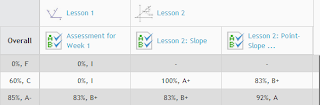
     Edu 2.0 grades the assignments and records the results in an online gradebook easily accessible by teachers and students.  This is great in that I don't have to remember which online platform I used to administer the assignment.  In the past, I have used a variety of webtools to assess student learning which makes it challenging to record grades, because if I wait too long, I can't remember which tool I used for the assignment!  In Edu 2.0, I am still able to  use a variety of tools, but all feedback is stored in one place. 
     I have been using Edu 2.0 for the past several weeks and I am extending its use to my traditional classroom and my weekend ACT prep class.   I will continue to work to create more self-paced options for credit recovery.  I think its applications and collaborative tools are perfect for self-paced, blended, or teacher directed classrooms.  I would love to know how others are incorporating Edu 2.0.  Please share ideas!

Saturday, March 10, 2012

Top Five Ways to Use Evernote in the Classroom

 I spent my Saturday night watching an archived webinar on Evernote in the Classroom by Bill Stites' via Classroom 2.0 Live's archives.  While I have used Evernote personally, I have never shared it with students mainly because I did not realize the full capability of the free organizing tool.  At Bill's school, Montclair Kimberley Academy, the teachers and students are using Evernote regularly for everything from sharing class notes to collaborating on projects. As I heard the many examples, it was easy to generate a list of the Top Five Ways to use Evernote in the Classroom!
1.  Students are able to email directly to Evernote.  The email capabilities are perfect for creating ePortfolios or using the app to organize scanned documents like worksheets and study guides. 
2.  Pictures can be imported to better illustrate an idea or just remember what was written on the whiteboard.  Coupled with Skitch, students are able to add captions and annotate directly on photos.  As a bonus, the text in the photo (even without Skitch) is "searchable"!
3.  Evernote's recording capabilities, allows students to record lectures or personal explanations and reflections.
4.  Students can create to-do lists to remember homework assignments or complete a multi-step projects.
5.  With Evernote's web clippling capability, students find it easy to organize useful articles, charts/graphs, and videos for research projects even from their iPad.
I thoroughly enjoyed the webinar!  From it, I learned Evernote is a note-taking/organizing app that can and should be integrated in the classroom. 

Monday, July 18, 2011

10 Lessons from Ron Clark Academy

A couple of years ago, I had the opportunity to attend a conference at Ron Clark Academy in Atlanta.  It was the absolute best professional development in which I have ever participated.  It changed the way I thought, planned, and conducted myself in my classroom.  The staff's creativity and enthusiasm was contagious.  I clearly remember the excitement I felt as I dared to imagine the possibilities at my own school.
I am headed back to RCA in just a few short weeks - this time for The End of Molasses Classes book release party.

I started calling friends as soon as I saw the notice!  When I called C, I started with," I am not sure exactly what the book is about...".  She responded, "If Ron Clark wrote it, it has to be good."  (She was with me last time.)  So, we (me and 4-5 friends) are taking a road trip.  Why go back?  I remember my last visit and the 10 lessons from RCA:
1.  Be passionate ~ About your subject, yes, but also, about your kids.
2.  Let your imagination go wild ~ Honestly, I would not have thought to invite a graffiti artist to my school in the middle of the night nor would I have dreamed to install a disco ball in my math class.  Both sparked excitement and enthusiasm in the students of RCA.
3.  People want to support people who are making a difference ~ I was amazed at the people who support the school's efforts.  It is clear to see the staff's vision and impact.  Businesses, parents, universities and celebrities have joined their efforts to change the world one child at a time.
4.  Be persistent ~ Teach and re-teach. Ask and ask again.  Make a goal and work toward it everyday.  Keep doing what is right and know that a breakthrough is coming.  Do not grow weary in doing good.
5.  Every child matters ~ Every student has a destiny that only he or she can fulfill.  It is our job to help them reach their fullest potential.
6.  Every child can learn ~ It must be the inherent belief of educators.  It is my responsibility to ensure an environment conducive to high achievement.
7.  Have fun ~ School should be fun; life should be fun.  Sometimes, adults forget to have fun.  Plan for fun.  I played school as a child.  Why? It was fun for me.  Recapture and use the memories of the childhood play to infuse life into the classroom.


A slide to get from the 2nd floor to the first?  Oh, yeah!  Slide certified:)
8.  Bring your whole self to the classroom ~ Embrace your own uniqueness and use your gifts and talents to reach and teach kids others can't.
9.  It's about the kids ~ Without students, we wouldn't need teachers.
10.  Essentials are essential ~ Setting expectations is one of the most important things we can do for ourselves and for our students (Inspiring Teachers).  The Essential 55 is a collection of expectations that address respect, manners, and an appreciation of others.  As a result of our previous visit, we developed our own Essentials for Excellence, expectations that are essential for a lifetime of success.

Friday, July 15, 2011

Personalized Pop Art Project

     Some months ago, I had the opportunity to Skype with Monica Hardy and learn more about her "Me Videos" project. The 3 minute videos give her math students an opportunity to introduce themselves, share what is important to them, and give insight to their personalities.  I loved the idea! 
     This morning, I was thinking about the George Rodrigue exhibit and how I could actually combine both art and the opportunity to get to know my students within the first few days of school.   What if I challenged students to take a picture that had some significance to them and turn it into pop-art?  
     I grabbed my camera and ran outside to try a few.  The result - a fun and easy project that will provide some insight into each new friend and will yield student created products that will be perfect for displaying in the classroom.                                                                                      
Original Image


Image transformed using Pop Art Lite app

Original Image: Water Lily

Image transformed using an online Pop Art Generator


Original Image: Stump that looks like a bear
Image transformed using Big Huge Labs online