For the past few months, I have been working to devise a credit recovery plan for 57 students at our school. This is the first time our principal has asked me to work to incorporate this during the school year. Typically, we run a first semester summer school in June each year; however, with the high stakes End of Course tests looming in the students near future, we knew we could not wait until summer to remediate.
I explored several options, for self-paced web-based options. While we could afford it this semester, we knew that as a long term solution, the online learning modules were beyond our budget. So, we tapped current staff members to teach at least one credit recovery class after school and on weekends.
I am teaching geometry. :) My class is compromised of students who not only need to make-up a math credit, but also an English or science during the same time slot. The kids are not sure which class they should attend to meet the mandatory attendance policy. They need help in two subjects, yet how can they be in two places at the same time? It is a challenge "sharing" students.
To better serve the students, I began to explore online options that I could manage and that were in our budget (FREE!). I looked at a couple of options for online classroom management and decided to try
Edu 2.0, an e-learning system a friend had shared with me almost a year ago. At the time, I had no real immediate need to use it. Now, I find it to be a perfect solution.
With Edu 2.0, the geometry students are able to access online learning modules that I have developed to learn anywhere and at anytime. Students are able to enter the password protected accounts to view relevant videos and notes and then take
quizzes to assess their learning.

I have structured it so that the quizzes replace paper based homework assignments. While there are many options for the question types, e.g. multiple choice, free response, true false, fill in the blank, I have decided to use fill in the blank. With fill in the blank questions, students can't just guess a multiple choice answer or click true/false. The questions also allow for pictures to be inserted. I have searched for this for years and Edu 2.0 is the first cost-free, ad-free, online quiz application that have found that allows a teacher to include pictures. We even have a paid version at our school that restricts question types to "words only". Geometry is based heavily on illustrations, so the ability to include drawings into the online questions was a non-negotiable when I was evaluating various online platforms. The quizzes have customizeable features that relate to feedback, number of attempts, and recording the best score earned.
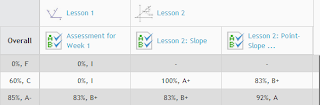
Edu 2.0 grades the assignments and records the results in an online gradebook easily accessible by teachers and students. This is great in that I don't have to remember which online platform I used to administer the assignment. In the past, I have used a variety of webtools to assess student learning which makes it challenging to record grades, because if I wait too long, I can't remember which tool I used for the assignment! In Edu 2.0, I am still able to use a variety of tools, but all feedback is stored in one place.
I have been using Edu 2.0 for the past several weeks and I am extending its use to my traditional classroom and my weekend ACT prep class. I will continue to work to create more self-paced options for credit recovery. I think its applications and collaborative tools are perfect for self-paced, blended, or teacher directed classrooms. I would love to know how others are incorporating Edu 2.0. Please share ideas!


