Friday, July 13, 2012

Fabulous Finds Friday: Teacher Binder

I love summer!  The sun on my nose.  Popsicles in the frig, hours to spend surfing the web and ambition to re-create what you see :D  This week, I found an organizational idea to incorporate into my class this Fall.  First, let me say I am a binder girl.  There was a time when my whole life was filed in one binder after another.  I somehow migrated away from the binders and I have never felt quite as "together".  So, when I saw this Teacher Binder, I was InSPiRed to make one too!  The binder includes sections for calendars, meetings notes, and lesson plans.   I am not quite finished putting it together, but I do have the calendarsweek-at-a-glance, and section dividers ready to share.
Click to Download
Click to Download

Click to Download
Hope you like polka dots!

Monday, July 9, 2012

Made 4 Math Monday: Welcome Podcast

I stumbled upon a post on 4th Grade Frolics by Tara inviting others to a Linky Party for Made it Monday in which participants would share classroom ideas and stay focused and productive this summer.  She and other elementary teachers had a wealth of adorable ideas.  Some, I could adapt into high school math, others were a stretch.  I knew I wanted to find a similar summer challenge of sorts for high school teachers... so, of course, I googled it:)  One of the top hits was a Made 4 Math Monday BLOG Party (and guess what I teach!!!) It actually started just last week.  It turns out that @pamjwilson and @druinok had seen Tara's post too! 
Free & Easy Podcasting
Created @ GoAnimate!
While I usually skew to the very arts and crafts side if given the opportunity, today I wanted to work on a "Welcome Podcast" for my new classroom website.   I used Cinch to record my message and Go Animate! to create an avatar (totally optional).  I uploaded a picture and attached my podcast link to it and... Voila! my WeLcoME PoDcasT is ready for the new school year:)


To actually do the WeLcoME PoDcasT:


I downloaded the Cinch app to my iPhone.


Created an account.


Plugged in the little white Apple headphones with mic that came with my phone.


Pushed record.  It was that EZ!!!
  

Thanks Pam for hosting the #Made4Math Blog Party.  It was just the motivation I needed!

Sunday, July 8, 2012

Project Snapguide: Making a Math Tutorial

Snapguide App
Did I tell you the iPads are coming?  It is official!  Our IT director and administration blessed the 1:1 iPad initiative for the 2012-2013 school year:D  So, I am busy this summer revamping lessons to include the NeW, BEaUTiFul, ShiNy, Oh-sO-PoWerFuL technology.  While I am not usually a "project" kind of girl, I have defined several activities I would like for students to complete and for lack of better terminology, I am calling the activities "projects".   I am busy defining the tasks, creating tutorials, and making rubrics to go with each one.

I have just completed an assignment in which students will use the Snapguide app to create a math tutorial for an assigned problem type.  Here is what I came up with:
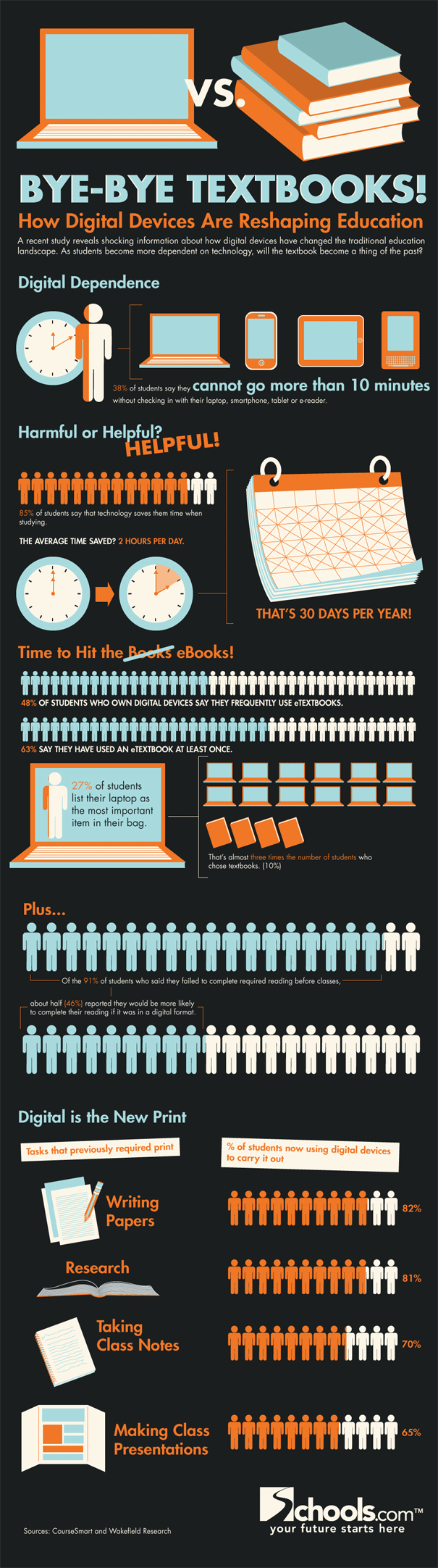
Task:  According to a Harris Interactive poll in the Spring of 2012, three in ten Americans own an e-reader. With the rise of Nooks, Kindles, and iPads, large textbook companies are moving quickly to electronic versions of content specific e-books.  This is causing Educational Content Writers to adjust how they communicate information.

Your task is to assume the role of a 21st century content writer and create an easy to understand Math Tutorial using the Snapguide app for the Textbook of Tomorrow.  The tutorial that follows details your task and provides a step-by-step tutorial on how to use Snapguide.  You will upload your completed project via the submission form posted on the class website. 

                   Tutorial: 
Click here to see tutorial

                    Rubric: 
    
                 Click here to view
I'll post all three project components on the class website and provide a place for the students to upload the projects.  I have the rubric scored for possible points being 5, 3, or 1 for each category.  Is it okay to score like this (counting by 2's)?  This is my first project in FoREvEr and of course, I am hoping they ALL make 20 out of 20.  So, please provide feedback, especially if you see that I am forgetting something important for their success!

Friday, July 6, 2012

Fabulous Finds Friday: Electronic Lesson Plans, Interactive Bulletin Boards, and More

With summer officially here (my last day for the school year was Tuesday), I have found myself surfing the web looking for fresh ideas and fabulous finds to make next year's teaching and learning even better.  I have found so many amazing resources shared by educators from around the globe.  I thought I would share a few of them here in a Fabulous Finds Friday post (I confess, I have been searching for a theme:)


My first incredible discovery is Janet Benincosa's fabulous website filled with numerous resources including technology resources, curriculum maps, and electronic lesson plans (which I had never seen and thought how easy it would be to customize for my state standards).  The electronic lesson plan allows the user to utilize a built-in drop down menu to choose standards, level of Bloom's, Marzano's strategies, modifications, and so much more!  


Kutztown University's Methods of Teaching Secondary Mathematics class has shared many ideas for interactive bulletin boards.  Photos, directions, and lesson integration are all available on their website.  Though the bulletin boards were designed with specific topics in mind, they can be easily adapted to fit any mathematics concept. 


via Pinterest
This teacher makes 5 New Student Packets in which she an extra of everything at the beginning of the school year.  When a new student comes in midyear, all of the first day items are handy and in one place.  I will definitely be doing this!  


Erin Eberhart shared a tip for creating Running Records using address labels, clipboard, and a pen. She makes notes on the address labels as she observes students.  For example, John is struggling with... At the end of the week, she places the address labels on the large index card she keeps for each student.  It makes it easy to keep track of each student's progress and share observations with parents. 


Birthday Treats
Classroom Happies

Finally, two fun things to make for my sweet students.  I love the erasers; they remind me of salt water taffy and the fair the way they are all wrapped up.  And then, the birthday Pixie Stix... which was from Success in Second Grade and though I teach students 10 grades higher, I still think they might like this birthday treat:D

Wishing you a great weekend.  I am off to discover more FaBULoUs FiNds!

Tuesday, July 3, 2012

Website in a Weekend with Weebly

So, sorry about the delayed blog post.  I have not been MIA, but simply launching a new website, The Classroom Cafe.  The new site resulted after my friend and co-worker, Kathleen, and I left Curriculum Camp so excited about the many ideas shared by presenters and our co-workers alike.  At the camp, we had talked about incorporating fun curriculum challenges into next year's faculty meetings (kind of like they do on all of the Food Network shows like Cupcake Wars and Top Chef).  We hoped those of us who chose to participate would be stretched professionally as we attempted to incorporate new ideas and strategies into our classrooms.  We knew we wanted a place to share successes, show pictures, reveal challenge items, and host weekly videos; thus, The Classroom Cafe was born.
The website creator of choice was Weebly!  I am sure I am late to the party (it was listed as one of Time's 50 best websites in 2007!!!) , but I must say this is the quickest and easiest website builder I have ever used (so, of course, I felt I should share with you:).  If you are unfamiliar with it like I was, it something that YoU CaN SO dO!
It was LitErAlLy a drag and drop process with extensive choices to customize my very own site.  I spent most of my time creating original artwork using my favorite Promethean software, but I could have just as easily used one of their many templates.  
Sample Student Site
Training Video
It was fun and satisfying to build the site in a weekend, which caused me to wonder how my students would respond to a similar challenge.  Weebly has educational accounts for both teachers and students.  Besides the obvious class website for hosting study guides, class notes, and tutorials, Weebly can be utilized by students to communicate research, house an electronic portfolio, share favorite books, report school happenings, demonstrate content knowledge using video, podcasts, and demonstrations, or host an online art gallery.  Truly, the possibilities are endless.  If you have not tried Weebly, I highly recommend it.  It's free!  It's easy!  It's worth checking out

Sunday, June 17, 2012

Brainstorming: Activities for Block

Image
     My mind is still spinning with ideas as I reflect on last week's Curriculum Camp.  Switching to Block Schedule, 90 minute sessions everyday, has me thinking about the number of activities I need to plan for each class period.  We will be on 4 x 4, where the students will take 4 classes for the 1st semester and 4 classes during the 2nd semester.  I was thinking that if I were teaching the same subject to different students both semesters, I could simply reuse the ideas and activities that worked during the Fall and tweak or discard those that didn't quite go as planned.  However, I do not teach the same subject twice, but I do teach the same students both semester - aaah!  No re-gifting activites :)
Image: http://aascd.com   
     I like to have one extra, over the top little something going on once a week.  Often, it centers around some sort of assessment of knowledge, which allows the students to continue to practice the big ideas beyond a worksheet or problems from the end of the chapter (Eww - Who really likes 40 practice problems lined up like neat little soldiers?)  During the Curriculum Camp we briefly touched on using games in the classroom, so I started ReALly thinking about "beyond the normal" ideas.  My motto is AlwAys: Go BIG or Go HomE!!! Here is what I came up with so far:
Human Graphing: Use tape to make a huge coordinate plane on the floor. Assign each student a number.  I thought it would be fun to pin their numbers to their shirts like runners get at a marathon to make them true Mathletes!  This would be their "number" to plug into parent functions. They would then graph themselves on the coordinate plane.
Human Fooseball: How can this be educational??? I don't know, but it looks so fun that I have to try it!!! The only thing I can come up with so far is have teams who score a goal, answer a review question for an "extra" point.  If the team, cannot correctly answer the question, the opposing team gets a turn to steal.
Giant Sorry: The game Sorry has about 20 -24 pieces - perfect to get all students involved.  I thought I could tape pre-determined questions to the floor in the shape of the Sorry game board.  As the students move around the game board, they would need to correctly answer questions or face a penalty of moving backwards.
Dance, Dance Revolution: I ordered these last year and have yet to unpack them :/
Amazing Race with Google Earth: I have found lots of ideas online for creating a classroom Amazing Race.  I am still sorting through this to make it applicable to my subject matter.
GeoCaching: I love online caches, but I was thinking something outside.
QR Code Scavenger Hunt:  Finally, found something that will work. I will share more later!
Snapguides: Have students create tutorials using Snapguide
Screencasts: Assign each student a question from the study guide to create a tutorial.  Post screencasts on an interactive study guide using Dabbleboard, Google presentation, or Prezi
Write a Short Story: The Story of X and how he found himself.  Publish short stories on class blog.
100's Chart Game: One of my all time favorites that I usually use on St. Paddy's Day.
Algebra vs The Cockroaches: Online flash game
Graph a Wave Party: Intro activity to introduce graphing trig waves complete with a little beach ball fun.
Image
Clue: Maybe this year I can add costumes??? I found a great example of how others have embellished the activity with lots of props.  I can't wait to transform my own classroom!!!
You Tube Turkey Hunt: Ok, technically this is a worksheet, but the students find a prize on You Tube and then get cupcakes at the feast.  CuPcAkeS and MaTh - no better morning!!!
Jenga: Not sure about this one.  I need to have someone who has actually played Jenga help me, but in the meantime, I have found a great example of how the game was used as a test prep tool.
Virtual Piano: I will be using this at Christmas time this year.  Self-checking activity in which students complete multiple choice questions and then play their answers on the keyboard.  If the answers are correct, the answers should yield a recognizable tune.  The students did not recognize the fight song last year; maybe they will get Jingle Bells easier.
ClassTools' War of Worlds: This is my standard "go-to" activity that I use for Open House, Back to School Night, and test review.  The students never realize they are working 30 plus problems in a matter of minutes.
Image
Socrative's Space Race: I need to think of Space Prizes to make this activity OuT of ThiS WoRLd.  Maybe this is where I can use the black light and glow in the dark bracelets.  I still trying to think of a way to incorporate these into an activity.
Image 
Hula Hoop Venn Diagrams: Why do graphic organizers need to be limited to a sheet a paper.  Why not make them a group activity by making them life size?  (I know, it is obvious I have become a bit obsessed with life sized games, but they look so fun.  Take a quick peek at Scrabble and Chess.  I am thinking these might be fun to play at lunch one day:)
     While this list is in no way comprehensive, it does give me a spring board for planning lessons on the block.  Some activities I have done before; others, I still need to wrap my mind around.  WhAt am I MiSSinG?  Do YOU have an AcTivIty that YOU will ShAre with me?

Thursday, June 14, 2012

Curriculum Camp 2012: Ideas to Engage, Enrich and Inspire

     This year marked Evangel's fourth annual Curriculum Camp!  The three day, fun filled event was packed again this summer, as participants learned more about teaching on block schedule, using qr codes to enrich lessons, flipping the classroom, and professional development opportunities accessible from home.
On Day 1, Cathy Carroll introduced a quote by John Strebe, "Teaching in a block schedule is like eternity, and eternity is spent in one of two places."  According to Cathy, planning will make all of the difference.  She was supposed to share a wealth of ideas for teaching English on block.  What we quickly realized however, was that this mAstEr TeaCHeR was sharing GreEAt teaching StraTeGies that would work in AnY SuBjeCt.  Her practical tips included having students record notes on butcher paper posted around the room, allowing students to write on the board, giving students graphic organizers to complete during direct instruction, whiteboard races, red ticket review, exit slips, pipe cleaner structures, old timey show and tell (students bring something from home related to content being studied), incorporating music in the classroom (maybe have the students select songs that relate to content), work one - check one (pairs of students are assigned two problems each works JUST one and checks the other), and voting with your feet (students stand by a poster with a number 1 - 3 that reflects how much they agree or disagree with the topic being discussed).  This veteran teacher of 37 years encouraged us to inspire students to become lifelong learners by making the content relevant to their lives.  She said, "If you show the kids how the subject relates to them, THEN they will learn it."
Image
     Kim Caise was booked to discuss QR Codes in the classroom.  Unfortunately, due to technical difficulties we were unable to connect to Kim live, but we were able to link to a previously recorded Classroom 2.0 Live session.  With phones loaded with QR readers like I-Nigma and BeeTag, we followed along as we saw QR codes placed in textbooks, on artwork, in libraries, and more! The webinar made such an impression that everyone continued to discuss the use of these quick read codes for the duration of the camp.
Image and More Info
     On Day 2, our own Kathleen Frey introduced the idea of flipping the classroom.  In a flipped class, a teacher leverages technology outside of class in order to maximize class time for student interaction, discussions, and projects. This idea caused quite a stir as camp attendees contemplated the possibilities.
     Paula Naugle joined us via Skype to present PD in Your PJs.  She shared a wealth of free resources in which participants can use learn about anything at almost anytime.  Some of Paula's favorites include webinars, YouTube channels, podcasts, Twitter, Diigo, and Pinterest.  From #edchats to Saturday morning educational programming, resources are readily available to continue to grow professionally.
The PoWEr of CoLLaBorAtion :)
     On Day 3, Charity Moran of Baton Rouge led us through Standards Based Planning for Block.  Charity modeled great teaching on the block during the 90 minute presentation in which she shared a unit planning web, lesson planning graphic organizer, lesson planning menu (my favorite!), an activity scaffolding template, and a sample for planning for science differentiation.  We practiced planning for the first day of school, the tenth day of the year, and sometime near midterm:


Oh, so many ideas packed into just three short mornings!  Thank you to all who presented and those who attended.  I don't know about you, but the collaboration and camaraderie left me feeling ENeRGizEd, ExciTed, and EaGeR for next year.