Showing posts with label building a website. Show all posts

Monday, October 1, 2012

Math imPossible: Part Deux

I was so excited about last week's Math imPossible online scavenger hunt.  I worked hard.  I planned.  I included audio and video and still the result was... less than sizzling.  Not that it was bad, but it turned out that page after page of math problems didn't yield the same excitement I imagined (but honestly, I thought 5 pages with 2-3 problems per page packaged as an online scavenger hunt style was hardly unreasonable for a review practice).  So why write about it again?
Well, one, because I fixed it and two, because I think it is important to reflect.  Regardless of how long I've been teaching, everything doesn't always work out the first time.  It is important to remember, I can't give up.  I can't quit trying new things.  I must continue to push the envelope.  I must re-evaluate.  What worked?  What didn't?   Don't sweat what didn't work...just fix it.
So, where did I miss the mark?  The fun-ness factor fell sharply after the initial discovery that our class website had been hacked.  But for that one moment of discovery, emotion was high!  The kids faces when they saw our regular site bearing the symbol of the hacker was priceless.  They bought in. They were hooked.
After they began working through the math problems though, the activity became more like an online worksheet (NOT what I was going for!).  I could see the enthusiasm waning as they worked their way through the website, so I asked a few kids what they were hoping for when they started the Math imPossible adventure.  Some suggested QR codes. Some wanted to run around the school.  Some thought the clues should be presented differently (the clues were obtained by playing "Guess Who" with only 5 questions).  All great suggestions and all feedback was appreciated!  Why? Because I want to get better.  I want them to have a positive emotional reaction to math, so that they don't dread it or fear it, but actually look forward to it.
This week's #Made4Math project is Math imPossible: Part Deux.  Better and Improved.  I kept Page 1 featuring the Powtoon video and activity explanation.
The clues were changed from the "20 questions/Guess Who" format to photos displayed after each correctly worked problem set.  Now every year, the culprit will be a senior boy with brown hair who plays sports (sorry, future students).
I added two "get up and move" opportunities.  In one, they run to the flag pole to get a key code which will virtually "unlock" the next picture clue.
In the other "get moving", they head to the library to scan a QR code clue which will reveal the color of the culprit's hair. (The QR clue was created with QR Code Kaywa.)  I hope "running wildly through the school" will add the fun factor the activity initially lacked (and yet, not get me fired!)
On the last page, I changed the actual "guess" process from entering the suspect's name in Rafflecopter to a Google form with a digital feel.
The initial activity was academically sound; the content was spot-on, no typos, not too hard, not too easy.  But if I work hours on a project, I want it to sizzle, not fizzle.  By making a few tweaks, I think this might just do it.  I'll get feedback again from my students and make adjustments as needed.  If this works (fingers crossed), expect an Amazing Race in my near future:)

Wednesday, September 26, 2012

Made 4 Math: Math imPossible

I am excited about this week's project.  In fact, it has been rolling around in my head since I was first introduced to Geocaching at a Discovery Summer Institute by Bridget Belardi.  Hooked by this around-the-globe treasure hunt, I began to toy with the idea of how to create a virtual cache for my students.  Ahem...several years later... I finally figured it out!  This week's #Made4Math project: Math imPossible.
Using my favorite new website creator, Weebly, the project was a cinch and is perfect for our upcoming test's review.  I first created a fictional scenario (the beloved class website was hacked).

And yes...I added a hacked page to the real class website and hid the actual pages from view (just in case the students checked).

I added a play-by-play animation created using Powtoon featuring a rendition of Mission Impossible (recorded by my amazing brother-in-law).

I then developed five webpages with 2-3 problems on each page.  The students can only advance from page to page by entering the hidden code obtained after working each problem correctly.

Here is a close up of the directions the students see on the bottom of each "clue" page:

The "clue" pages were marked as hidden on Weebly...so that only the home page for the math task is visible.  In Weebly, I was able to name the pages; they were named according the the answers generated from the review problems.  I added "t1" in front of each page so that I will remember the activity was for "Test 1".

After students work through all of the review problems, they are able to enter a guess as to who they think may have hacked our site using Rafflecopter.  Whether my Super Sleuths correctly guess the culprit or not, I am more hopeful that this approach to review helps them successfully crack the assessment on test day.

Wednesday, August 8, 2012

Class Website Ready to Roll

I truly feel like Frank on You've Got Mail.  You know, "The nut from the Observer who is in love with his typewriter", except I'm not a guy, I'm a girl.  And, I'm not in love with my typewriter... I'm in love with my NEW Class WeBsiTe!!! (Plus, I would like to think "nut" would be debatable from those who know me well:)  Last week, I posted about creating a class website header for my new online format.  

For this week's #Made4Math, I changed my First Day Handout so that it would match the header.

Then, I thought the handout was so-o-o cute with the lined paper background that I wanted to re-create it on my Weebly site.   Despite watching a You Tube video and reading several articles, I could never quite get my image to tile in the background like the tutorial showed.  It looked fine in the preview, but when I added elements to my page, the image was covered.  Long lead in to say that, I figured out a work around.  Here's what I realized...in Weebly, the page dividers are thin gray lines.  So I dropped a few page dividers on top of one another and stacked together they look like...are you ready...lined notebook paper!!!

And if you have notebook paper, you have to have paper clips and doodles:


I drew the clipart in ActivInspire and took screenshots of the doodles. Though lesson notes and assignments will be added as the year unfolds, the website is finally ready to launch.  Good thing, too - school starts tomorrow!  Here's a shot of the finished product: 
Live Site

Wednesday, August 1, 2012

Classroom Website Header and Page Dividers

Okay, with #Made4Math Mondays and #favFridays, I felt a little pressure to create a theme for this random post in the middle of the week....so, this is my #webWednesday :D  Seriously, this summer I have blogged quite a bit about moving my class's landing page from a blog format to a website.  By doing so, I hope to create a more permanent home for resources and assignments organized in units rather than by dates as they were on the blog.  Over the past few weeks, I have designed iPad projects, created a welcome podcast, and now, designed my website banner and page breaks for daily posts of online bellwork.  While I tossed around numerous design ideas (you know, I love my polka dots), I've decided to go with ....drum roll...the composition notebook black and white scheme.  So, without further ado...the banner:

and the page breaks:


(I just realized I should probably explain the logo; I teach two high school classes (ECA and LHS) simultaneously in one dual enrollment class.)  I kind of like the black, white and red scheme.  Anyone else maintaining a class website and wouldn't mind sharing?  I would love to see how you have your resources and assignments organized. 

Monday, July 9, 2012

Made 4 Math Monday: Welcome Podcast

I stumbled upon a post on 4th Grade Frolics by Tara inviting others to a Linky Party for Made it Monday in which participants would share classroom ideas and stay focused and productive this summer.  She and other elementary teachers had a wealth of adorable ideas.  Some, I could adapt into high school math, others were a stretch.  I knew I wanted to find a similar summer challenge of sorts for high school teachers... so, of course, I googled it:)  One of the top hits was a Made 4 Math Monday BLOG Party (and guess what I teach!!!) It actually started just last week.  It turns out that @pamjwilson and @druinok had seen Tara's post too! 
Free & Easy Podcasting
Created @ GoAnimate!
While I usually skew to the very arts and crafts side if given the opportunity, today I wanted to work on a "Welcome Podcast" for my new classroom website.   I used Cinch to record my message and Go Animate! to create an avatar (totally optional).  I uploaded a picture and attached my podcast link to it and... Voila! my WeLcoME PoDcasT is ready for the new school year:)


To actually do the WeLcoME PoDcasT:


I downloaded the Cinch app to my iPhone.


Created an account.


Plugged in the little white Apple headphones with mic that came with my phone.


Pushed record.  It was that EZ!!!
  

Thanks Pam for hosting the #Made4Math Blog Party.  It was just the motivation I needed!

Tuesday, July 3, 2012

Website in a Weekend with Weebly

So, sorry about the delayed blog post.  I have not been MIA, but simply launching a new website, The Classroom Cafe.  The new site resulted after my friend and co-worker, Kathleen, and I left Curriculum Camp so excited about the many ideas shared by presenters and our co-workers alike.  At the camp, we had talked about incorporating fun curriculum challenges into next year's faculty meetings (kind of like they do on all of the Food Network shows like Cupcake Wars and Top Chef).  We hoped those of us who chose to participate would be stretched professionally as we attempted to incorporate new ideas and strategies into our classrooms.  We knew we wanted a place to share successes, show pictures, reveal challenge items, and host weekly videos; thus, The Classroom Cafe was born.
The website creator of choice was Weebly!  I am sure I am late to the party (it was listed as one of Time's 50 best websites in 2007!!!) , but I must say this is the quickest and easiest website builder I have ever used (so, of course, I felt I should share with you:).  If you are unfamiliar with it like I was, it something that YoU CaN SO dO!
It was LitErAlLy a drag and drop process with extensive choices to customize my very own site.  I spent most of my time creating original artwork using my favorite Promethean software, but I could have just as easily used one of their many templates.  
Sample Student Site
Training Video
It was fun and satisfying to build the site in a weekend, which caused me to wonder how my students would respond to a similar challenge.  Weebly has educational accounts for both teachers and students.  Besides the obvious class website for hosting study guides, class notes, and tutorials, Weebly can be utilized by students to communicate research, house an electronic portfolio, share favorite books, report school happenings, demonstrate content knowledge using video, podcasts, and demonstrations, or host an online art gallery.  Truly, the possibilities are endless.  If you have not tried Weebly, I highly recommend it.  It's free!  It's easy!  It's worth checking out

Sunday, March 11, 2012

Credit Recovery + Edu 2.0 = Success


     For the past few months, I have been working to devise a credit recovery plan for 57 students at our school.  This is the first time our principal has asked me to work to incorporate this during the school year.  Typically, we run a first semester summer school in June each year; however, with the high stakes End of Course tests looming in the students near future, we knew we could not wait until summer to remediate. 
     I explored several options, for self-paced web-based options.  While we could afford it this semester, we knew that as a long term solution, the online learning modules were beyond our budget.  So, we tapped current staff members to teach at least one credit recovery class after school and on weekends. 
     I am teaching geometry. :)  My class is compromised of students who not only need to make-up a math credit, but also an English or science during the same time slot.  The kids are not sure which class they should attend to meet the mandatory attendance policy.  They need help in two subjects, yet how can they be in two places at the same time?  It is a challenge "sharing" students.
     To better serve the students, I began to explore online options that I could manage and that were in our budget (FREE!). I looked at a couple of options for online classroom management and decided to try Edu 2.0, an e-learning system a friend had shared with me almost a year ago.  At the time, I had no real immediate need to use it.  Now, I find it to be a perfect solution. 
     With Edu 2.0, the geometry students are able to access online learning modules that I have developed to learn anywhere and at anytime.  Students are able to enter the password protected accounts to view relevant videos and notes and then take quizzes to assess their learning. 
edu20 05b Assignment Types
     I have structured it so that the quizzes replace paper based homework assignments.  While there are many options for the question types, e.g. multiple choice, free response, true false, fill in the blank, I have decided to use fill in the blank.  With fill in the blank questions, students can't just guess a multiple choice answer or click true/false.  The questions also allow for pictures to be inserted.  I have searched for this for years and Edu 2.0 is the first cost-free, ad-free, online quiz application that have found that allows a teacher to include pictures.  We even have a paid version at our school that restricts question types to "words only".  Geometry is based heavily on illustrations, so the ability to include drawings into the online questions was a non-negotiable when I was evaluating various online platforms.  The quizzes have customizeable features that relate to feedback, number of attempts, and recording the best score earned.
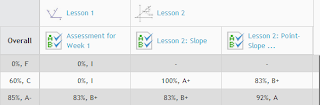
     Edu 2.0 grades the assignments and records the results in an online gradebook easily accessible by teachers and students.  This is great in that I don't have to remember which online platform I used to administer the assignment.  In the past, I have used a variety of webtools to assess student learning which makes it challenging to record grades, because if I wait too long, I can't remember which tool I used for the assignment!  In Edu 2.0, I am still able to  use a variety of tools, but all feedback is stored in one place. 
     I have been using Edu 2.0 for the past several weeks and I am extending its use to my traditional classroom and my weekend ACT prep class.   I will continue to work to create more self-paced options for credit recovery.  I think its applications and collaborative tools are perfect for self-paced, blended, or teacher directed classrooms.  I would love to know how others are incorporating Edu 2.0.  Please share ideas!

Wednesday, July 13, 2011

Blog Makeover

Ahhh, summer!  A chance to reconnect with what you love.  Stay up late, sleep in, read a zillion new books, and blog.   I realized that I have over-extended myself through the years with the many blogs I have started and then neglected.  This blog, for example, has been in existence for 3 years and I have a whopping total of 15 posts!  It is not that I have been so busy that I haven't posted.  No, I just haven't posted here.  So today, inspired by SM, I revamped the look of my blog and I have promised myself that I will limit the number of blogs I nurture to two - one dedicated to ALL things related to school and one lifestyle blog.  No more compartmentalizing my education-related blogs, if it has to do with teaching and learning, you will find it here.
   To celebrate, I created a new header with ActivInspire, uploaded a snazzy background with Blogger's helpful Template Designer, and even changed the web address to something more inclusive and less stuffy and formal. Thanks for visiting School Stuff :)