Showing posts with label Checking for Understanding. Show all posts

Saturday, January 2, 2016

How Do Your Students Know What They Know and When Do They Know It?

     How do you know what your students know?  When do you know it? What do you do once you realize that there are gaps in the learning? During my first few years of teaching I would be so disappointed on the day of the test, because I thought that my kiddos had a good grasp on the content only to see assessments roll in with incorrect answers or worse...no answers at all on some of the questions.  I knew that I needed to change something and so did my students.
     15 years later after much growth in my profession, my burning questions have grown to include 'How do my students know what they know and when do they know it?'.  I feel strongly that students must be given the opportunity to evaluate their own knowledge in a non-punitive assessment, so that they can discover where their gaps are prior to the day of the test.
     Attached is my presentation on ways to Check for Understanding presented at Marshall ISD's Destination Success Conference.  The ideas go beyond the 3 question quiz, the use of Socrative, Plickers, Google Forms, and Kahoot, all of which are wonderful tools; here I share quick and easy activites that can be incorporated into your classroom tomorrow.  I have blogged about many of these strategies over the years and have included the tag "check for understanding" on all of the posts related to the presentation.  So, if you are looking to add a little twist to your daily warm-ups or exit tickets, you are in the right place!

Have Students Show What They Know with Educreations

     Anyone who has followed this blog for any length of time, knows that I love my iPads due to the creativity that the devices allow students to show.  I am passionate about students creating content rather than just consuming it and the more innovative that they can be while demonstrating their knowledge, the more I love it!  Educreations allows for just that...it is like a blank sheet of paper just waiting for the artist to begin.
     In this project, students show what they know and help others in the process.  The details below include a task, a tutorial, and a rubric for the creation of math videos using the screen recorder.  In this activity, students will assume the role of an online course developer and create a screencast using Educreations, an app that is easy to use and 100% reliable in uploading and sharing work.


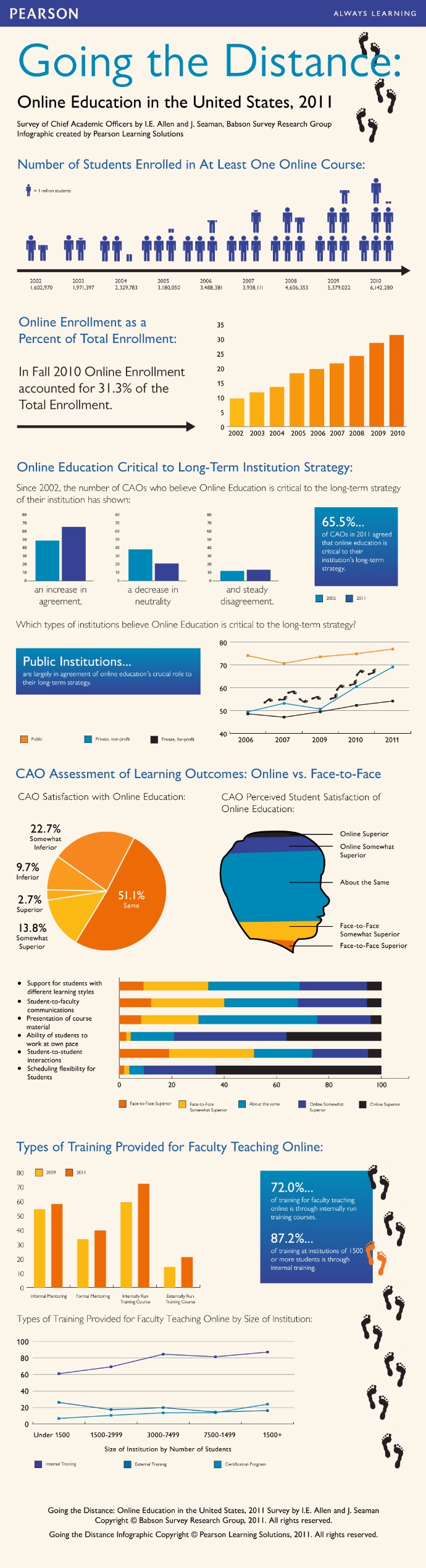
Overview: "For the past nine years the Sloan Consortium and the Babson Survey Research Group have taken a look at the state of online learning in the United States. The 2011 survey reveals that the number of students learning online has now surpassed six million, with nearly one-third of all students in higher education taking at least one online course.  Last year’s annual survey revealed the largest ever year-to-year increase in online enrollment since the study began eight years ago." - Going the Distance  

 "Online learning has numerous benefits, including expanding course offerings, customizing and personalizing learning, giving struggling students a second chance to master a subject through online credit recovery when they fall behind, and providing a rigorous, interactive learning model. Online learning is providing the content and integration of digital tools for portable and mobile learning opportunities." - iNACOL 

Your task is to assume the role of an online course developer and create a screencast using the Educreations app for our online course resources.  The Screencast Tutorial that follows details your task and provides information on how to use the app.  You will upload your completed project via the submission form posted.  


Tutorial:


Rubric:

Rubric


Feel free to borrow, edit, and use with your students:)

Monday, June 17, 2013

#Made4Math: Dice Game

Last week was a whirlwind for me.  I attended the Ron Clark Academy (RCA) 3-day National Conference and then our school's annual Curriculum Camp.  My mind is spinning and I have yet to process it all!  So, for this week's #Made4Math post, I opted to start with the simplest idea I heard this week which was shared by Adam Dovico of RCA, the dice game.  In the true spirit of #Made4Math, I hit the local dollar store this weekend to purchase 4 packs of dice and came up with one concrete concept with which to use them.  First, let me say that I normally DON't do worksheets ever, ever, ever, but I made an exception because I looooovvvved the Dice Game idea.  It works with any age and any subject!

What you need:
One die  per two students (or the Dice app downloaded to each student's phone), one pencil per two students, and one worksheet for each child

How to play:
1.  Divide students up into groups of two.  The goal of the game is to complete the worksheet before your opponent does.  Though, when described to our staff by Mr. Dovico, by design there is rarely, if ever, a winner.

2.  Give both students a worksheet (perfect for test review, multiplication review, factoring practice...literally, anything!!!).  Hand one student the die and give the other student the pencil.

3.  Count down for the game to begin.  When the game starts, one student grabs the pencil and begins work on the paper, while the other student begins rolling the die hoping for a "6".  The student rolls the die repeatedly until a "6" is rolled.

4.  After rolling a "6", students swap the die and the pencil.  The student with the pencil works on the independent practice worksheet until his opponent rolls a "6".

5.  Monitor students' progress as you walk about the classroom.  Allow the game to continue until students get close to completing the worksheet, count down for the game to end prior to anyone actually winning, so that there will be a sense of urgency next time you play.

For this activity, I focused on second semester's Trigonometry class, because my second semester could use an infusion of fun.
Word doc or pdf
 I created practice problems to review finding other trig functions given one value and the quadrant, but the idea could be used anytime and anywhere!

Monday, October 22, 2012

Made 4 Math: Geting Our Groove On

This week is Homecoming at our school which brings dress up days, senior activities, lots of enthusiasm and the unique challenge of keeping students moving forward academically in the midst of the week long celebration.  Our senior students are in class for only two days this week and their minds are on their community service/fun day, kings' and queens' presentation, and of course, the big dance - the inspiration for this week's #Made4Math project.  Tomorrow, we will GeT OUr GrOOvE oN in math with RM Easiteach's Dance to Advance and their Dance, Dance, Revolution-like mats.  I've used the RM Easiteach software to create a matching game focused on graphs and their equations.
The RM mats work as directional mouse pads and are controlled by students stepping on them to select a correct match to the problem displayed in the center of the screen.  I have 8 dance mats which I will connect to 4 computers.  Students will play two at a time to try to achieve the highest score by correctly matching the most functions to their corresponding graphs.  I plan to use a "dance-off" bracket to determine the winner in hopes of getting in some extra practice disguised as friendly competition.
 I was able to customize the game board quickly.  For the graph choices, I uploaded pics that were created in my Promethean ActivInspire software.  I inserted images of the functions as well, so that the equations would be clear and easy for the students to read in the fast pace game. (I didn't want funny syntax to slow them down.)

I love that before the game begins students can select the background and the music.  I know that it is silly, but somehow I would like to think I could  match graphs better if I were at the beach:)

Monday, October 8, 2012

Made 4 Math: QR Code Scavenger Hunt

Ok, you know I love my QR Codes.  I have used them for a little bit of everything, but this is my first QR Code Scavenger Hunt and I can't wait to see the students' reactions!  This #Made4Math activity was designed to get kids out of their chairs...way out!  We are going outside (which makes me a bit nervous) and we are using our BYOD cellphones in public (which makes me A LoT nervous).  Before the activity, I plan to send a quick email to my principals (2 campuses/2 principals) to let them know what we are doing and during the activity, each group of students will carry a hall pass (included in the project file) complete with a brief explanation of the task and necessary supplies (specifically, the cellphone!!!).
Planning the activity was quick and easy.  I started with 7 quadratic equations for solving ranging from pretty basic to completing the square with a leading coefficient other than "1".  I entered each problem into QRStuff to create the codes.
QRStuff was easy to use with the text elements (math problems).  I like the way the equations show up immediately on the students' phones when I select "embed text into code as is".
As always, I used Promethean's trusty ActivInspire to take screenshots of the QR codes and pasted the codes into a Publisher document for printing purposes.  I will tape the codes in various places on campus, though you could just as easily keep this hunt within the confines of the classroom. When students scan the code using a QR Reader like i-nigma and BeeTagg, they will immediately see this:
After working the problem, they will use the answer choice key to be directed to the next location. I made 6 variations of the key so that the groups will not be moving from location to location in a specific order.
If by chance a computational error occurs and the students end up at the wrong location, the code they find will advise them to check their work again.
A few codes were added that create a "twist" in the hunt (I am trying to re-connect with my inner sense of fun and adventure:).  One reads, "Oh no!  Into your plans, someone has thrown a wrench.  The real clue can be found beneath an outdoor bench."  (I think they will like it...)
Never one who likes to be confused on the "day of", I included the location on the codes so that I will know where to post them. We will try it this week and I'll let you know how it goes:)

Monday, September 10, 2012

Made 4 Math: Tune into Math

Last week, I found myself in need of a quick and easy way to review EvERyThiNg covered thus far in the semester.  You see, I had been out 6 Sch00l DaYs in a RoW!!!  I am not sure that I have missed much more than 6 days total in my 13 years of teaching, much less so many consecutively, but my sweet, precious boy found himself under the knife 1600 miles from home.  So what does a mom/teacher do?  Post as much as possible on the class website and catch the next plane out!
     The students stayed busy while I was away (The first 2 days they were out of school due to Hurricane Isaac; the last 4 they were on the web).  We have an online component, Math XL, that we utilize in class, so we employed the program as a way to practice previously covered material.  I could tell from the online score reports that not everyone progressed successfully through all of the review and an activity was needed to tie it together.  I pulled out a long time favorite and this week's #Made4Math project, Tune into Math (yes, I just made the name up).
     I love this activity, because it super simple and can be made in a flash (while sitting in an airport waiting for your flight).  Tune into Math is a self-checking multiple choice worksheet in which the answer choices correspond to notes on a piano.  When a student finishes the review sheet, they "play" their answers on an online keyboard or the Virtuouso app.  The tune is always something familiar so that they know immediately if an answer needs rechecking.
     While I hand wrote my multiple choice questions, I could have just as easily used a test generator like Exam View (that came with my textbook) or the Glencoe website chalked full of multiple choice quizzes for every high school subject.  (If I were to use a traditional multiple choice option, I would just need to white out the A, B, C, and D choices and replace them with the notes to a song.)
You don't need to play the piano yourself to know the notes to code.  There are plenty of places online with help for songs like Mary Had a Little Lamb, Jingle Bells, Happy Birthday, or the one I used:

Twinkle, Twinkle Little Star (for the Virtuouso app)
C4 G4 G4 A4 A4 G4 F4 F4 E4 E4 D4 D4 C4


Friday, August 31, 2012

Favorite Find Friday: Silent Math Movie

The iPads have not yet arrived, but school is in full swing and we are harnessing the power of the students' cell phones.  In the first 10 days of the school year, we have used phones to communicate, create math tutorials, and assess understanding!!!  In preparation of the iPads' arrival, I have uploaded another project to the class website using a favorite app which was generously shared at Mobile 2012 by TechChef4U.  #MyFavFriday app, Vintagio, transforms any video captured on an iPhone or iPad into a period style movie, complete with special effects and music. Vintagio, previously known as Silent Film Director, can be used to create everything from a 20's style silent film to a 70's style home movie and everything in between.  It is quick and easy to use and allows for film editing, special effects, photos and images, transitions and insertion of title cards.

In the Silent Math Movie project, the students will create a math tutorial without words.  I am so excited to see what the kids will do - their first project with iMotion HD was fantastic!  I'm including the task, sample video, and rubric just as the students will see it.

Task:
"After the depression of the 1890s, immigration jumped from a low of 3.5 million in that decade to a high of 9 million in the first decade of the new century. After the 1880s, immigrants increasingly came from Eastern and Southern European countries, as well as Canada and Latin America. By 1910, Eastern and Southern Europeans made up 70 percent of the immigrants entering the country."  - Eye Witness to History

The earliest American films, which appeared around 1895, were primarily a working-class pastime. Because they told stories without words, they appealed to the large, immigrant population in the United States.  A picture that did not talk was particularly appealing to people who did not speak or read English. - History Matters

Your task is to go back in time and create a movie "showing" how to solve a specific mathematical problem using the  Vintagio app. The challenge?  You must work without words in groups of 2 to create a 2 - 5 minute film that will serve as an easy to understand Math Tutorial for your classmates.  Have fun with this project; part of the appeal of silent films were the creativity directors used in lighting, props, costumes, and movements of the actors.  This is your opportunity to let your creativity shine!
Image From Chaplin Museum

Sample: Math Tutorial


Rubric:
Click for larger view

Giveaway:
Want to try #MyFavFriday app, Vintagio, in your classroom?  MacPhun, LLC has generously donated a free code for me to share!  Enter via the Rafflecopter widget below:
a Rafflecopter giveaway

Monday, August 27, 2012

Made 4 Math: Stop Motion Animation

     We are two weeks into the new school year and our iOS projects are in full swing.  Students are utilizing cell phones and iPads daily to elaborate upon and reconstruct content covered in class.  They are in essence creating their own version of the Interactive Student Notebook (ISN or INB), except their's are Digital Student Notebooks (DSN) :D  Students have to truly synthesize the information in order to effectively "teach" it and I certainly believe "teaching" helps them remember.  In fact, the National Training Institute (1999) stated that learners retain 5% of what they hear in a lecture, 10% of what they read, 20% of material presented both audibly and visually, 30% of what is demonstrated, 50% of what is discussed in groups, 75% of what they practice, AND 90% of WHAT THEY TEACH.
     Last week, my friend, Kathleen, introduced me to the coolest app used in this week's #Made4Math project, iMotion HD.  (She had students use it to summarize human migration research conducted in World History; I had students use it to create a math tutorial. We loved it so much that we highlighted it at The Classroom Cafe too!)) Here's a quick overview...the Dual Enrollment students created stop motion tutorials to review concepts covered in class and to re-teach others who may not have had a clear understanding.  Each group of students (I would recommend no more than 3 in a group - 5 was too many!) chose from several problem types.  Then, they utilized iMotion HD  to make their animations.
The details of the project including the task, a sample student created video, and the rubric are included for you to take and make your own:
StopMotion Math Task
Stop Motion animation debuted long ago in films.  The first instance of a stop motion film was seen in The Humpty Dumpty Circus in 1897.  It is often used to show objects moving on their own.  In a stop motion film, the animator makes inanimate objects "come to life" by moving the objects through a scene.  The films are created when a series of interlocking pictures are played together through a scene.  When all of the pictures play it looks as though the objects are actuall moving (kind of like a flip book). Your task is to assume the role of a stop motion animator and create a math tutorial film for our online course resources using the iMotion HD app.
Sample Student Video


Rubric
Click to View
The projects turned out great!  The free app was so easy to use.  I observed the students talking more about the curriculum content than the mechanics of making the movie. Yay!

Monday, August 20, 2012

Made 4 Math: Scratch Off Cards


Last week, inspired by someone's Scratch Off cards, I decided to try some of my own.  (Sorry, I scanned all of the posts listed, but couldn't find the source. Please let me know if this was inspired by YOU so that I can link to your blog.)  I had my student workers create an invitation for an upcoming Professional Development using the scratch off idea to make the announcement for PD a bit more interactive.  My student workers, high school juniors and seniors, got so excited about what they had created that they were literally showing everyone who would look.  By the time we put them in the teachers' boxes, we could hardly contain ourselves!
This week's #Made4Math project will hopefully capture the enthusiasm shared by the three workers and re-create it in the classroom.  I have created 4 sets of cards to review content covered over the past few days (exponents and radicals cards).  Each card has 4 questions (actually the same problem types they will see on an upcoming test).  The questions target the same focus skills but actual numbers vary slightly on each card.  I have outlined the 4 questions with a colored box to distinguish between card sets.  I will divide students into 4 groups by color: blue, green, red, yellow.  
The students will work each of the 4 questions in their notebook and compare answers within the group.  When the group settles on the correct answers, they will transfer all work to the question cards. They will then cover their work with clear packing tape and paint the tape with the scratch off solution: 2 parts paint and 1 part dish soap. We will let the paint dry and re-use the cards later to review again for the test.  This time students will trade cards with others from different color groups.  They will work each others' cards and then scratch to see if they are correct.  If answers are incorrect, students will be able to see each problem worked correctly and in detail so that they can discover what went wrong.  I know, I could review the 4 questions in a more traditional way, but I think the scratch off element (which takes all of 2 minutes to complete) will add a delightful twist :)
Use gray paint to cover cards quickly. Top with silver to add sparkle.

Sunday, July 8, 2012

Project Snapguide: Making a Math Tutorial

Snapguide App
Did I tell you the iPads are coming?  It is official!  Our IT director and administration blessed the 1:1 iPad initiative for the 2012-2013 school year:D  So, I am busy this summer revamping lessons to include the NeW, BEaUTiFul, ShiNy, Oh-sO-PoWerFuL technology.  While I am not usually a "project" kind of girl, I have defined several activities I would like for students to complete and for lack of better terminology, I am calling the activities "projects".   I am busy defining the tasks, creating tutorials, and making rubrics to go with each one.

I have just completed an assignment in which students will use the Snapguide app to create a math tutorial for an assigned problem type.  Here is what I came up with:
Task:  According to a Harris Interactive poll in the Spring of 2012, three in ten Americans own an e-reader. With the rise of Nooks, Kindles, and iPads, large textbook companies are moving quickly to electronic versions of content specific e-books.  This is causing Educational Content Writers to adjust how they communicate information.

Your task is to assume the role of a 21st century content writer and create an easy to understand Math Tutorial using the Snapguide app for the Textbook of Tomorrow.  The tutorial that follows details your task and provides a step-by-step tutorial on how to use Snapguide.  You will upload your completed project via the submission form posted on the class website. 

                   Tutorial: 
Click here to see tutorial

                    Rubric: 
    
                 Click here to view
I'll post all three project components on the class website and provide a place for the students to upload the projects.  I have the rubric scored for possible points being 5, 3, or 1 for each category.  Is it okay to score like this (counting by 2's)?  This is my first project in FoREvEr and of course, I am hoping they ALL make 20 out of 20.  So, please provide feedback, especially if you see that I am forgetting something important for their success!

Wednesday, June 24, 2009

Curriculum Camp Day 4: ClassTools.net


ClassTools.net: Create interactive flash tools / games for education

Curriculum Camp attendees create original flash games to be utilized with their ActivBoard. ClassTools.net does all of the work for us on the gaming side. Type in the curriculum content to generate a custom game.

Classtools.net allows you to create free educational games, activities and diagrams in a Flash! Host them on your own blog, website or intranet! No signup, no passwords, no charge! Game links are saved to the computer and links can be embedded into the flipchart presentation. Games can be used again and again.
The students absolutely love to "play" games in class. In fact, they beg to continue to work to improve in each challenge! I wonder if they realize that they are reinforcing ideas and concepts along the way?